
If you work in the nonprofit sector, you already know the heavy demands of grant writing. You spend hundreds of hours searching through databases like Grants.gov, reading long Request for Proposal (RFP) PDFs, and carefully matching your mission statement to strict guidelines—often for a very low success rate.
Having a full-time assistant would change everything. Fortunately, there is a massive new trend sweeping the tech world right now that gives you exactly that.
Right now, OpenClaw AI is absolutely exploding in popularity across the internet. Everyone from developers to small business owners is talking about it, and for good reason. It is an open-source, autonomous AI agent that runs directly on your computer. It actively browses websites, reads complex documents, and completes tasks entirely on its own.
In this guide, we will show you how to ride this huge tech wave and turn OpenClaw into your tireless, 24/7 digital grant researcher.
Here is what you will learn:
-
Why OpenClaw is incredibly safe for your private charity data.
-
How to easily set up OpenClaw on your local computer.
-
How to teach the AI your mission statement so it finds the perfect grants.
-
How to bridge the immediate funding gap while you wait for those big grants to clear.
Why OpenClaw is the Ultimate Free AI Tool for Nonprofits
Before you start downloading software, you might wonder why you shouldn't just paste your grant applications into a standard web browser AI. Here is why OpenClaw is currently taking the tech and nonprofit worlds by storm:
-
Unbeatable Data Privacy: OpenClaw runs entirely on your local machine or a private Virtual Private Server (VPS). Your interaction history, configuration, and uploaded documents are stored locally as plain text Markdown files. This means your sensitive donor lists, financial PDFs, and proprietary program details never touch a public server unless you explicitly authorize it.
-
Seamless Instant Messaging (IM) Integration: OpenClaw connects directly to the chat apps your team already uses, like Slack, Telegram, or Discord. Instead of logging into a complicated dashboard, you simply send a text message to your AI assistant. This is perfect for nonprofit leaders who are constantly out in the field. You can ask for a quick summary of a grant while riding the bus to a community event, and your agent will text you right back.
-
True Autonomy (Skills): OpenClaw connects directly to external APIs and the web via its "Skills" marketplace (ClawHub). You can tell it via a Telegram message, "Search the web for environmental grants in California closing in the next 30 days and summarize the top three," and it will autonomously browse the internet, read the pages, and message you the results.
-
A Full "Virtual Team" of Agents: OpenClaw allows you to run a main agent that acts as a project manager, alongside several specialized sub-agents. Think of it as creating a complete virtual department. You can ask your main agent to start a funding project. It will automatically direct your "research sub-agent" to find the right databases, while asking your "writing sub-agent" to outline the proposal. They work together in the background to finish complex, multi-step projects much faster.
-
Highly Cost-Effective: The software itself is completely free and open-source. You only pay for the API calls to the Large Language Model (like Anthropic's Claude or ChatGPT) powering its "brain," which typically costs just pennies per task.
Step 1: Bringing Your AI Assistant to Life
Here is the best part about OpenClaw: you do not need to be a software engineer to use it. While the underlying technology is incredibly advanced, the way you interact with it is as simple as texting a friend.
Instead of struggling with complex code, here is the modern, stress-free way to set up your digital grant researcher:
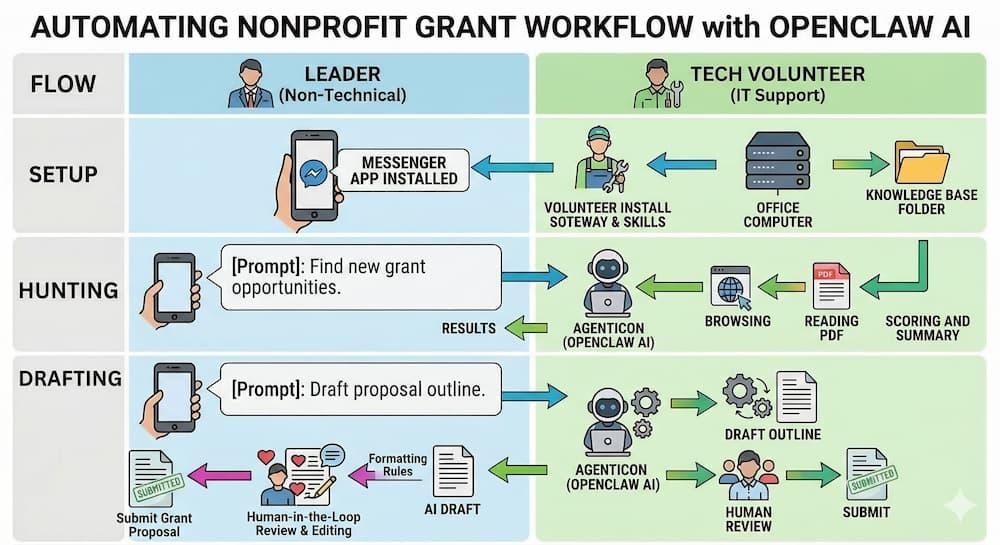
1. Tag in a Tech Volunteer (The Setup Phase)
Because OpenClaw is a powerful, open-source tool, the initial installation requires a bit of IT knowledge (and a focus on cybersecurity to keep your donor data safe). Don't do this yourself! This is the perfect micro-volunteering opportunity. Ask your organization's IT person, a tech-savvy board member, or a local university computer science student to install the "OpenClaw Gateway" on a secure computer in your office. It takes them about 20 minutes.
2. Connect It to Your Phone
This is where the magic happens. OpenClaw isn't a clunky dashboard you have to log into; it lives in the messaging apps you already use. Have your tech volunteer connect the AI to your organization's Slack workspace, a private Discord server, or simply a Telegram or WhatsApp number.
Once connected, your new digital researcher simply appears as a contact on your phone.
3. Build the "Knowledge Base" Folder
You don't need to know how to code to teach the AI about your mission. Simply ask your volunteer to create a secure, local folder on the office computer. Drag and drop your past successful grant proposals, your mission statement, and your budget PDFs into this folder. OpenClaw will automatically read them and learn your organization's unique voice without ever sending that data to the public internet.
4. Send the "Welcome Text" (Your First Prompt)
Now, pull out your phone. Open WhatsApp or Telegram, open your chat with the AI, and send it its job description. You can literally copy and paste this text:
"Hi! You are now the expert grant writer for our nonprofit. I have placed our organization's historical data and mission statement in your local folder. Your job is to act as my autonomous grant researcher. When I ask, please browse the internet for foundation and government grants, read the guidelines, and compare them against our local documents to see if we are a strong match."
That’s it. No coding required. You are now ready to start hunting for grants while you're waiting in line for a coffee.
Step 2: Automating the Grant Hunt (Scraping and Matching)
Now that your digital assistant is living right on your phone, it is time to put it to work. You can finally say goodbye to spending your Friday nights scrolling endlessly through Grants.gov.
1. Send the "Mission-Fit" Text
Instead of manually searching for opportunities, you can simply pull out your phone and send a quick message to your OpenClaw contact. You can use a prompt like this:
"Look up the newly announced EPA community grants. Read the guidelines and score the opportunity out of 10 based on how well it matches the programs outlined in our knowledge base."
2. Let the AI Do the Heavy Reading
Once you hit send, OpenClaw goes to work in the background. It will autonomously browse the internet, locate the correct government website, and download the massive 50-page PDF guidelines. It reads through all of that dense bureaucratic language in seconds.
3. Review Your Instant Summary
Because the AI already knows your mission statement and past programs (from the folder you created in Step 1), it will automatically cross-reference the new grant requirements with your internal documents. Within a minute or two, your phone will buzz with a brief, easy-to-read summary highlighting exactly why you should—or shouldn't—spend your valuable time applying for it.
Step 3: Drafting the Initial Grant Proposal
Finding the perfect grant is only half the battle. Staring at a blank screen and trying to figure out how to structure your application is often the hardest part of the process. Here is how your AI assistant helps you cross the finish line.
1. Conquer the Blank Page
If your OpenClaw assistant replies with a grant that looks like a 9/10 match, you can immediately tell it to start writing. Just send it another quick text:
"This looks great. Please draft a 5-page proposal outline for this EPA grant. Use the tone, style, and formatting of our past successful applications."
2. Delegate the Tedious Formatting
Your agent will instantly generate a highly structured first draft for you. It will piece together an executive summary, a needs statement, and a proposed budget narrative, all based entirely on your actual historical data. It handles all the boring formatting rules so you don't have to.
3. Add the "Human-in-the-Loop" Magic
This is the most important rule of using AI in the nonprofit world: never let an AI submit grants for you blindly. AI is incredibly efficient, but it completely lacks human empathy, nuance, and lived experience.
OpenClaw’s job is simply to conquer the blank page and do the tedious formatting. Your job as a nonprofit leader is to take that draft, inject the real, emotional stories of the communities you serve, and verify every single data point before hitting "Submit." Human connection is what ultimately wins the funding.

The Reality Check: Bridging the Funding Gap Today
Here is the hard truth about institutional grants: even if OpenClaw helps you write the perfect proposal, government and foundation money can take anywhere from 6 to 12 months to hit your bank account.
Your nonprofit has operational costs, community needs, and payroll today.
While your AI agent is grinding away at long-term institutional applications in the background, you still need immediate, unrestricted cash. This is where you combine your high-tech AI strategy with frictionless, grassroots community support.
Instead of waiting months, take just 3 minutes to set up a *spotfund campaign. It is the #1 rated fundraising platform on Trustpilot and the easiest way for your local community to support you right now.
Why is *spotfund the perfect bridge for your nonprofit?
-
0% Platform Fees: Your service is completely free (with only standard 2.9% + 30¢ processing fees), meaning more of the money your community raises goes directly to your cause.
-
Next Day Payouts: This is the most critical feature. The money your community raises on Tuesday can be used to keep the lights on by Wednesday.
-
AI Fundraising Tool: Keep the AI momentum going! While OpenClaw is busy researching grants, you can use *spotfund's built-in ChatGPT story writer to instantly craft an engaging, emotional campaign description.
-
Easy Sharing & Donation Widgets: Share your campaign quickly to 10+ social channels, or easily embed the Fundraiser Donation Widget to bring your organization's website to life.
-
Text To Donate & QR Codes: Perfect for your offline community events. Prompt your donors with sleek SMS messaging, or simply let them point their phone cameras at a QR code to contribute instantly.
Drop your *spotfund link on your social media, embed the widget on your site, and let your community keep you funded today while OpenClaw secures your funding for tomorrow.
Need operational cash this week? Start your 0%-fee *spotfund campaign right now.
Conclusion: Fund Your Mission Faster
The future of nonprofit work isn't about working harder; it's about working smarter. By setting up an open-source AI agent like OpenClaw, you can reclaim hundreds of hours of administrative research and finally get ahead on those massive institutional grants.
But you don't have to wait months for that funding to arrive.
Pairing your new AI research strategy with a fast, community-driven platform like *spotfund ensures your organization never runs out of the vital cash it needs to operate daily. Let your digital assistant handle the long game, while your community handles today.